Boot Process
📝 Author
Birat Aryal — birataryal.github.io
Created Date: 2026-03-21
Updated Date: Saturday 21st March 2026 21:25:20
Website - birataryal.com.np
Repository - Birat Aryal
LinkedIn - Birat Aryal
DevSecOps Engineer | System Engineer | Cyber Security Analyst | Network Engineer
The Boot Process on Linux - On-premise and EC2 - AWS are kind of similar. Apart from few components are added on the Cloud based instance creation. The EC2 Boot process only includes the additional step that would be carried out on the cloud infrastructure. Like for the On-premise environment if we create the VM we define the resources first on the VMware or any of the virtualization layer.
🖥️EC2 Boot Process - Pre-provisioning
When we first launch an EC2 instance AWS would process these information:
- AMI ID: The AMI has the type of the Operating system that is to be deployed. This AMI ID also determines what type of boot mode is to be used. UEFI/BIOS E.g.. RHEL, Ubuntu etc.
- Instance Type: This looks which resource to apply to the Instance that is created. like t2micro, t3nano etc.
- Subnet: What subnet is to be applied while creating an ec2 instance and where the subnet lies on which VPC
- Security Groups: What policies are to be applied, if needed to create the new policy then it would create the policy first.
- Key Pair: For the accessibility of the ec2 instance what public key is to be used.
- IAM Instance Profile: This verifies the role assigned to the EC2 instance that would be created. Suppose if the EC2 instance needs to have the access of the s3 bucket or the dynamo DB, then IAM Instance Profile would be attached which would be the separate container or the service provided by AWS which would attach the only one policy defined in the IAM role. This only acts as a wrapper as EC2 API could not directly attach role.
- Block Device Mapping: This defines how the storage is attached to the instance at the launch time. We are basically telling AWS where the disk exists and where should they come from and how they should behave. The volumes are attached to the instances via Nitro and exposed to the instance as NVME devices.
- Meta Data Options:
- User Data: This stores the first time configuration script that is to be executed inside the instance. This would be used later on at the cloud-init step.
⚙️ Boot Process
On the EC2 once the pre-provisioning tasks are completed then once the instance or VM is created then it would be powered on this process.
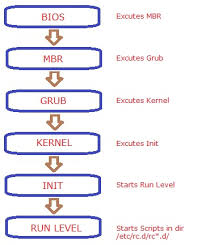
- BIOS/UEFI: framework is loaded which stores the details of the partition type that is to be used either GPT or MBR.
- POST: after the BIOS is loaded then it would check all the external devices like keyboard, mouse, CPU, RAM, Disks would be checked and if any corruption is seen then it would be shown on the console itself.
- Boot Loader: Grub2 bootloader would be loaded which would then trigger the kernel modules that would be required for the OS to boot. Since Linux is compiled in C++ all the modules required for the OS to boot would be loaded at first.
- Kernel Load: Once received the signal for the modules to be loaded then all the kernel dependent modules are loaded and once all the modules are loaded then it would send the signal to the init or systemd initialization.
- Init/Systemd: Systemd services would be started which would start all the services required for the system services.
- Run Level: At this stage OS would be started and then other user level services would be started at this stage like: user login, graphical interface, network, user profiles initialization,
cloud initinitializationswith user data scripts, configurations inside /etc
🛠️Possible Issues & Resolutions
☁️AWS
Misconfigured /etc/fstab
If the ec2 instance is misconfigured on /etc/fstab then we could use the disk mounted on ec2 instance inside / partition, we could mount to another ec2 instance and use that instance to fix the issue.
Steps:
1. Navigate to the ec2 instance which is corrupted. (checks would fail on the instance)
2. From instance state get the screenshot of the current state inside the ec2 instance which would give more insight of the root cause of the issue.
3. Power off the corrupted instance
4. Inside the storage detach the EBS storage which is mounted on the / partition.
5. Create new instance and attach the corrupted detached disk as new disk inside new ec2 instance
6. Inside the new ec2 instance new disk is seen.
7. Using file command to know which partition is the old / partition.
file -s /dev/nvme2n1p1
8. Mount this to any of the temporary file and patch the issue in this directory.
mount -t xfs -o nouuid /dev/nvme2n1p1 /mnt
9. Update the /etc/fstab and fix the corrupted entry.
10. Reattach the storage to the old ec2 instance and try powering up the instance.
🐧VM
Misconfigured /etc/fstab
Attach the live iso to the seperate disk in the VM then after follow the same process as that of the ec2 instance to fix any of the issues whether it be as normal as /etc/fstab or updating the sysctl configurations.